Twool!


The story of Twool!


This design project focuses on understanding how shape and sensation can be manipulated through the use of overtwisted yarn. We researched the material properties when using overtwisted yarn and investigates the beneficial effects of overtwist by employing an exploratory hands-on methodology to establish a comprehensive sample library. By using a spinning wheel, yarns were twisted in different degrees and directions (s-twisted and z-twisted), after which they were woven and knitted into samples. As a result, we managed to control the overtwist within the fabric to a certain degree, causing a visual and sensational effect.
The project made overall use of the first-person design perspective. A second-person design perspective was implemented through sample testing to validate the usability and feel of each material. The sample library, with support from the user tests, contributes to existing knowledge about over-twisted yarn, and could have interesting applications, e.g. for fashion and product designers.


EDZO

The story of EDZO

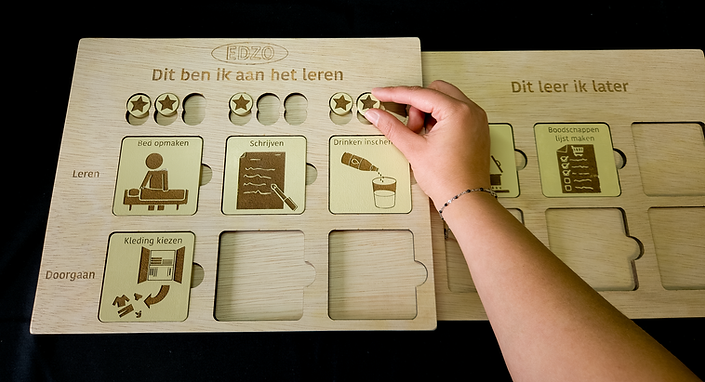
EDZO is designed to help parents of a young adult with Down syndrome with the development of their independence. Someone with Down syndrome needs more external motivation and clear communication around performing and learning new skills and repetition is important within this. The role of the parents within this independence development process is very important. They will need to keep initiating, motivating and providing the time to practice. This can make it hard for the parents to keep their child and themselves motivated to keep practising skills to improve with little steps their independence.
EDZO will help by providing a visual communication tool and providing an external motivation through a reward system. By being visual present within the home, EDZO can provide an external reminder to all family members to keep practising without adding pressure on the parents.
EDZO makes it also easier to plan for future skills that could be practiced. These plans can be placed on the second board that will slide behind the main board. In this way it will not distract during the mundane days and the focus can then stay on the skills that they are working on at that moment.


Huggabag


The story of Huggabag


Huggabag is a bag that ‘holds’ you as a person. It visualizes loneliness data in 3 ways to express to people that they are not alone in this feeling and reach awareness for this (mostly) unspoken subject. The data used is from a research by Pyle and Evans, 2018. The data shows the frequency with which people feel lonely. The outside of the bag is a general overview of the data, grouped by age from left to right. How lonelier an age group feels how smaller the cut-outs in the fabric are. The second layer is personalized to the user by visualizing the loneliness frequency in their individual age group. The third way to visualize the data is on a completely personal level. The user can adjust the thickness of the bag on how lonely he/she/they feels at the time. The increase in thickness will allow the bag to hold the user firmer which will feel like a strong hug.


SIAI - AI research to social interactions


The story of SIAI

Our main research question was: ‘Can unexpected factors created by an AI in a shared space create connections between strangers?’ The focus was first led on the sub-research question: ‘Which data does an AI need to be able to stimulate interaction between people?’. And eventually: ‘Can a body language driven AI artifact stimulate strangers to interact with each other?’
Social interactions between humans are important for the well-being of the involved humans. Therefore, this research was started to explore how body postures play a role in social interactions and how an Artificial Intelligence (AI) looking at body posture factors could be used to stimulate this. At first an observational study was performed to find out how people would interact ‘naturally’ inside a small group with strangers where they had a collective or individual

goal. An important insight was that the body posture of people seemed to be linked to the amount of social interaction that they performed. Based on this, the SIAI (Social Interaction Artificial Intelligence) was designed. An intelligence that visualizes the openness of people their body posture in the form of a fan. The performed study with SIAI gave further insides in the way that people interact with each other and the influence of their body posture. However, SIAI did not give convincing evidence that a body posture AI visualization had a stimulating effect on the social interaction between strangers.

Mushy


The story of Mushy


Mushy is an alarm clock that is based on the motivation to stimulate a more positive relationship with your alarm clock. The group’s shared aesthetic preference was the use of nature in designs, that is why we have chosen to make use of biomimicry and anthropomorphism.
A mushroom is fragile so it stimulates people to interact in a gentle way with it. Therefore we chose this form to stimulate a tender touch and a caring interaction to stimulate a positive relationship with your alarm. When the user interaction in a careless way with Mushy it will react by getting ‘up set’. Mushy will go down and lighting up red, and it will stay like this for 30 seconds. When the user does not change its interaction the time it stays down will go up. This will learn the user to care for its ‘fragile’ alarm clock.
Mushy can be set on by giving it a little tap on the cap. It will give an understanding by light pulse and grows. The time can be set by placing the amount of dots on the cap, the large dots are hours and the smaller dots are 10 minutes. After 5 seconds of not placing any dots, Mushy will let the user know it understands it and will show this with a light pulse and goes down (in rest mode). During 6 hours before going off, Mushy will grow and in the least half an hour it will start lighting up slowly. The user will be waked up by the light and a calm nature sound. Because we gave Mushy a playful character it will also start a little dance when it goes off. By laying your hand softly on the cap the snoozing function is activated for 10 minutes. Setting off can be done by tapping on every lighting dot till they all are off. This interaction is based on the fact that people are less likely to fall back asleep when they have used a physical assignment or brain assignment. Switching Mushy completely off can be done by giving it again a little tap, as reaction all the dots will fall of the cap.

Guart


The story of Guart

Guart is an intelligent art piece communicating your home's status and general wellbeing, notifying you of maintenance needs and potentially dangerous situations. It supervises various sensors distributed throughout the house and receives alerts from connected devices. Then it categorizes the information and links it to the corresponding urgency level. It then communicates the urgency level through form and movement in the abstracted depiction of the house's floorplan.
The product itself is an artful abstraction of your house's floorplan, that you hang on the wall in your living room. All rooms can move individually and use that ability to communicate servicing alerts through form and motion. These alerts are categorized into a 4-level urgency mapping, each having a complementing movement. Next to this general urgency scale, you can access additional information about the notification through augmented reality. Looking through your phone you can see where and what the exact problem is. Once a problem has been dealt with or has been identified as a false positive, you can calm the system down by petting the room in question. Since the device is idle when your house is well taken care of, it can be unclear whether the system is still working properly or not. For that reason, Guart responds to any eye contact with a short wave, reassuring the user that it's doing all right.

Holactiva


The story of Holactiva


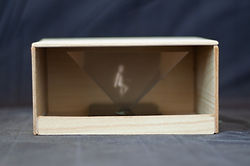
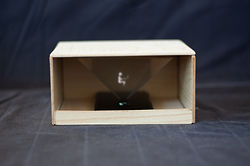
Holactiva was designed with the goal of visualizing an employee’s productivity level and using this as a trigger for more active ways of working. Holactiva does this by tracking the mouse, keyboard and laptop activity of the user and displaying this as holograms. It shows different types of advice to you in the form of a hologram depending on how long you have been unproductive, for instance, to take a walk, drink coffee or even have a walking meeting and on the other hand if you have been working productively for some time a thumbs up will appear to help you keep up the good work. The device works with a ‘friends' option meaning that you connect your device to your co-worker’s device. This way co-workers can choose that they want to get connected advice and do active work together when you’re both unproductive.
We started our design process with a critical review of an already existing product: Apphia. From there we came up with different ideas to improve Apphia, in the form of 80 sketches. We then combined these ideas into different design concepts, storyboards and low-fi prototypes. Halfway through the project, there were 2 versions, a high one and a low one. To decide which version had the preferences of users we conducted a user test. This showed that the low version was most desired.
Learnum


The story of Learnum


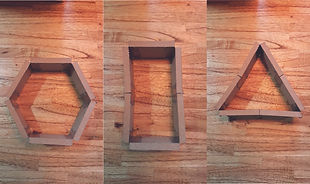
In project 1 I had the tasks to make the prototype of the twister field, doing research to Gilles de la Tourette, contacting organizations, and do the user tests.
By contacting the different foundations, families and schools I learned to write more professionally. I also learned how to analyze answers and to make and use graphs. By changing the way to perform the user test due to COVID-19 I needed to adapt these to what was possible. Due to this I practiced how I could explain our game and the assessment for the families in not too many words but still understandable. During the making of the questionnaire I learned how to formulate questions so that they would be clear and not two sided.
By thinking out and making the real size prototype I have learned the whole process of making a product out of fabric. To learn the technical parts I first made a few little prototypes of one shape. I could not make a new prototype of fabric but have tested it to see what could be improved. These improvements were to make the circles and squares smaller so they would be better recognizable while being blindfolded, this is implemented in the movable prototype. The foam a little thinner, is something that should first be tested with more participants before it is sure that it will be an improvement. For the prototype from Simons Says in sign language I needed to learn the important signs and the grammatical rules.
The prototype that I made has the option to change shapes and places due to Velcro. I used the knowledge that I already had of working with foamboard. Before working on the physical prototype I created a digital sketch with the dimensions.
Due to a new division of tasks it was not possible for me to work on the business part of the product and learn more about that. The electronic part of sound was due to the questionnaire left out the final product. That is why I have not learned more about how I could work with these electronics.
The collaboration went well within the team. There were discussions about choices that needed to be made and this was harder over the texts. But when we planned a meeting over teams it went well and we could decide together the best choice. For me personally was the group not the best team for me. The planning and division of tasks was at the start not clearly planned. After a while of working from home the task division began to improve, however plannings were still not always clear.
This project gave me the insight that I can also help people with a problem like a disability by designing a product for another target group. This helped in a way to make my vision more clear because I now know that I want to design for the target group itself with the problems or difficulties.


HexBox


The story of HexBox

HexBox is designed as a project for a loyalty company. It is a new kind of displaying the products that customers can save for. Every box is a separate part of the stand. This makes it possible for the store to design the layout of the stand themselves. To help with thinking of possible ideas, a manual with options was provided. Each box was design in a way that they could differ in form. This was also used as improvement on the transport of the stands. Each box could be made flat so they would take less space up in the van. Another part of the design was the display and lights inside the boxes. The displays would show more information about the campaign when the customers was interested. The lights would light up when a customer walks past the stand to attract the attention of the customer.